
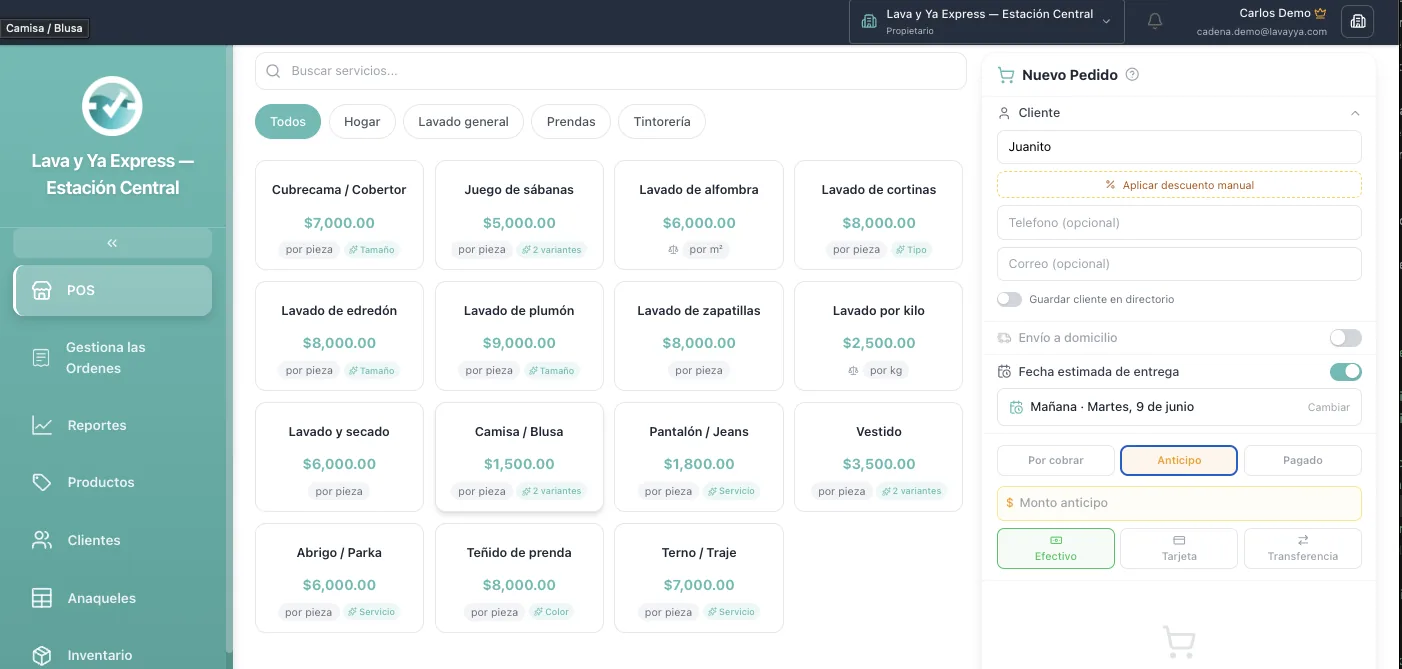
Point of Sale (POS)
Create orders, apply discounts, and manage payments instantly.
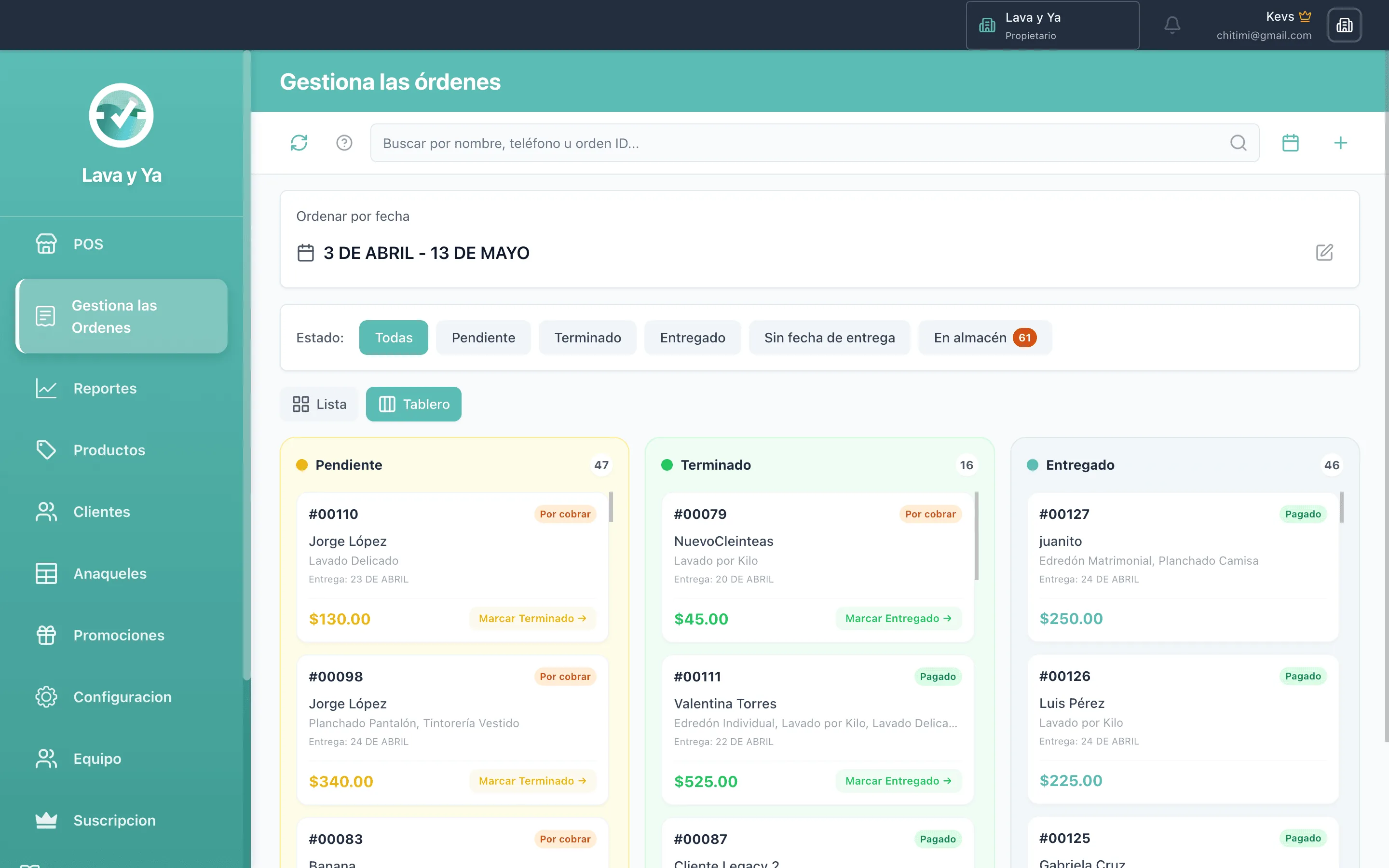
Order Management
Track order status, assign teams, and ensure timely delivery.
What Is a POS System for Laundromats
A Point of Sale (POS) is the system you use to record sales, charge customers and manage transactions. In a laundromat, a good POS does much more than just take payments — it becomes the control center for your entire operation.
Unlike a traditional cash register or a paper notebook, a digital POS lets you automate processes, reduce errors and see real-time information about your business.
Why Your Laundromat Needs a POS
1. Faster Service
When a customer walks in, they don't want to wait while you look up prices or do mental math. With a POS:
- You pick services with a few taps
- The system calculates the total automatically
- You generate the ticket in seconds
The result: customers served faster — and happier.
2. Zero Pricing Errors
Calculation mistakes cost money. A dollar short per order can add up to thousands a month. A POS eliminates those errors because:
- Prices are pre-loaded in the system
- Totals are automatic and exact
- There's no room for confusion or slip-ups
3. Service and Inventory Control
A modern POS lets you know exactly:
- How many orders of each type you process
- Which services are most popular
- When to add new services or adjust pricing
4. Automatic Customer Records
Every time you create an order, the customer is recorded. That lets you:
- Know their purchase history
- Offer personalized promotions
- Identify repeat customers and treat them as VIPs
Key Features of a Laundromat POS
Customizable Service Catalog
Your laundromat offers specific services: wash by weight, pressing, dry cleaning, comforter washing. A POS should let you:
- Create categories (Wash, Press, Specialty)
- Set prices per unit, pound, kilo or piece
- Add variants (special detergent, express turnaround)
Digital and Printed Tickets
A good POS gives you both options:
- Digital ticket: sent to the customer via WhatsApp. It can't get lost, can't get stained, always available.
- Printed ticket: for customers who prefer a physical receipt with your logo.
Multiple Payment Methods
Your customers pay in different ways:
- Cash
- Credit or debit card
- Bank transfer
- Digital wallets
The POS should let you log any method and generate separate reports.
Sales Reports
At the end of the day you need to know:
- How much you sold
- How many orders you processed
- What your average ticket was
- How today compares to yesterday or last week

A POS generates those reports automatically — without you lifting a finger.
Generic POS vs. Laundromat-Specific POS
There are plenty of POS systems on the market, but they're not equal. A generic POS (built for any kind of business) can work, but:
- It doesn't understand laundromat workflows
- It lacks specific features like order statuses
- It requires a lot of manual setup
- It can be more expensive and complicated
A laundromat-specific POS like Lava y Ya comes ready to use:
- Pre-built categories for laundry services
- Order statuses (pending, in progress, ready, delivered)
- WhatsApp ticket integration built in
- A simple interface any employee can use
How to Implement a POS in Your Laundromat
Step 1: Set Up Your Catalog
Before you start, list every service you offer with its price. That's the only setup you need.
Step 2: Train Your Team
A good POS is as easy as WhatsApp. In under an hour, any employee can learn to:
- Create orders
- Charge customers
- Look up past orders
- Generate tickets
Step 3: Start Using It
From day one you'll have:
- Every sale recorded
- Automatic reports
- Complete customer history
Step 4: Review and Adjust
Every week, look at your reports. Spot opportunities:
- Popular services worth promoting
- Slow hours where a deal would help
- Repeat customers worth rewarding
Long-Term Benefits
Data for Smart Decisions
With months of data, you can:
- Forecast future sales
- Plan investments
- Negotiate with suppliers using real numbers
Scalability
If you open a second location, your POS scales with you. Same reports, same information, all centralized.
Professionalism
Customers notice the difference between an organized business and one running on guesswork. A POS projects professionalism and builds trust.
Conclusion
A POS isn't an expense — it's an investment that pays for itself. It cuts errors, saves time, improves the customer experience and gives you full control of your business.
If you're still running on notebooks and a calculator, it's time to make the leap. Your laundromat deserves it.
---
Modernize your laundromat today. Sign up free at Lava y Ya and get access to a professional POS built for your business.